We’re excited to bring the new Theme Browser to the Dramatica Narrative Platform.
You now have two main ways to explore the model:
- 3D Table — a spatial view of the complete Table of Story Elements
- Theme Browser — the classic, top-down view for moving through Domains, Types, Variations, and Elements
Both views are designed to make Dramatica Theory more visual and easier to work with while developing a story.
1. Start with the whole model

The classic Theme Browser lays out all four Domains together—Universe, Physics, Psychology, and Mind—so you can see their relationships at a glance. From the controls across the top, you can search for an item, change the level and resolution, zoom in or out, or switch between Explore and Set Storyform.
2. Set Storypoints directly from the browser

In Set Storyform mode, open the menu on any item to see the Storypoints it can represent. Here, Progress can be assigned as an Objective Story Concern or Benchmark, a Main Character, Influence Character, or Relationship Story Concern or Benchmark, or a Story-level Storypoint such as the Story Goal.
That keeps the model itself at the center of the Storyforming process: find the thematic item that speaks to your story, then assign it where it belongs.
3. Watch the Storyform take shape
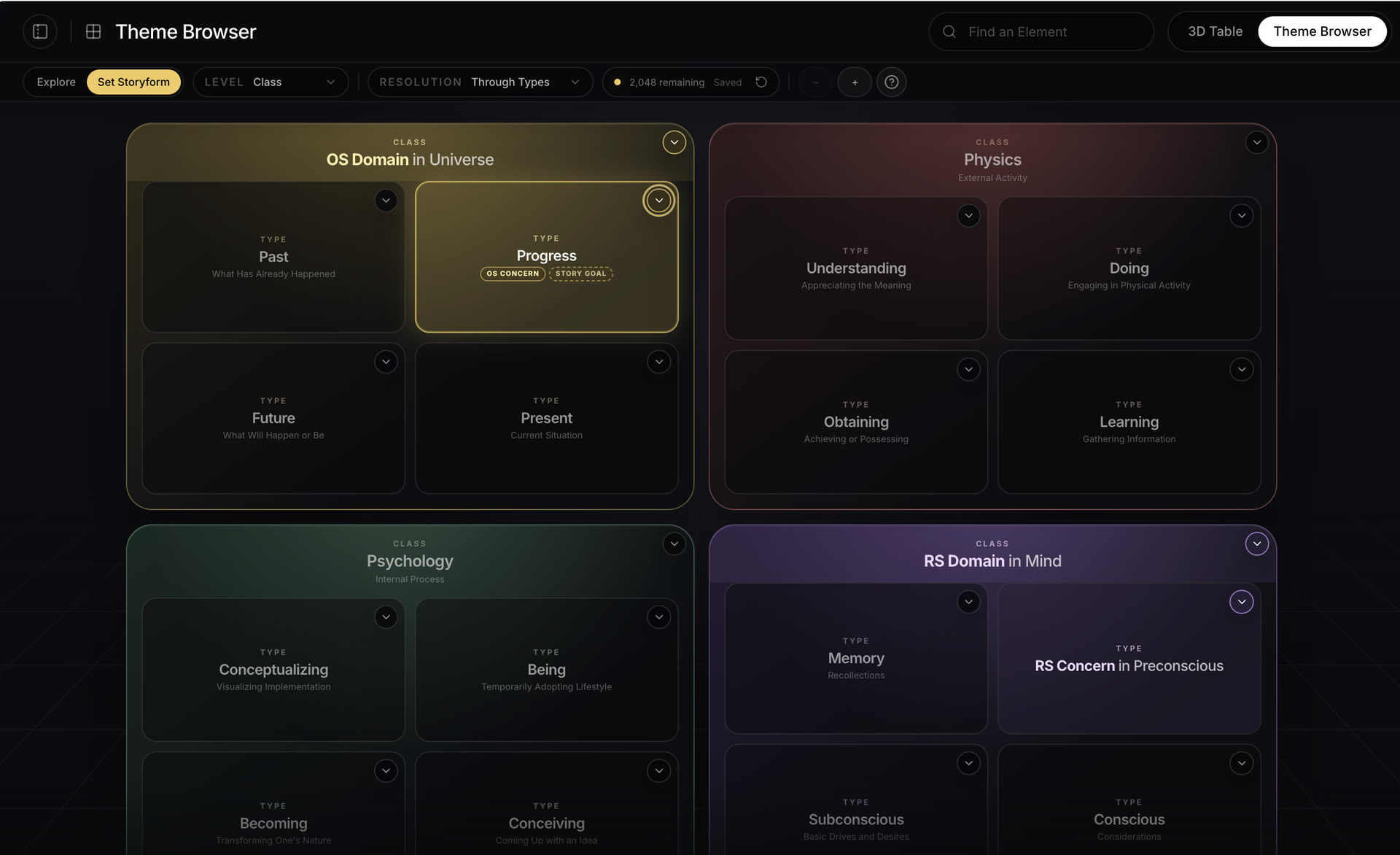
As choices are made, the Theme Browser labels them directly in the model. In this example, Universe is the Objective Story Domain, Progress is both the Objective Story Concern and Story Goal, Mind is the Relationship Story Domain, and Preconscious is the Relationship Story Concern.
The remaining Storyform count updates as you work, unavailable alternatives fade into the background, and the saved state is visible in the toolbar. Instead of holding the structure in your head, you can see the shape of the story emerge.
4. See thematic relationships more clearly

The closer view makes relationships between Storypoints much easier to recognize. Here, Fantasy is the Objective Story Issue, while Unending and Ending are marked as the Objective Story Problem and Solution.
Seeing those choices together helps connect a story’s thematic Issue to the underlying forces creating—and resolving—its conflict.
5. Know what you choose and what Dramatica determines

The assignment menus distinguish between Storypoints you can choose directly and values that Dramatica will set automatically from the structure. In this example, Fantasy is automatically determined as the Objective Story Issue, while it remains available as a direct choice for Objective Story Catalyst.
The aim is to make the model’s logic visible without making you manage every dependency yourself.
Or explore the complete model in 3D

The 3D Table presents the same model spatially, with controls for viewing the whole table or focusing on a single branch. It is ideal when you want to see the larger geometry of the model and how its major parts relate across levels.
You can move between the 3D Table and classic Theme Browser at any time using the switcher in the upper-right corner.
The new Theme Browser is available now under Narrative Resources → Theme Browser in the Dramatica Narrative Platform:
We’re genuinely excited to bring this feature to the platform, and we hope it helps everyone connect more visually with their story’s thematic Issues. Give it a try, explore both views, and let us know what you discover.