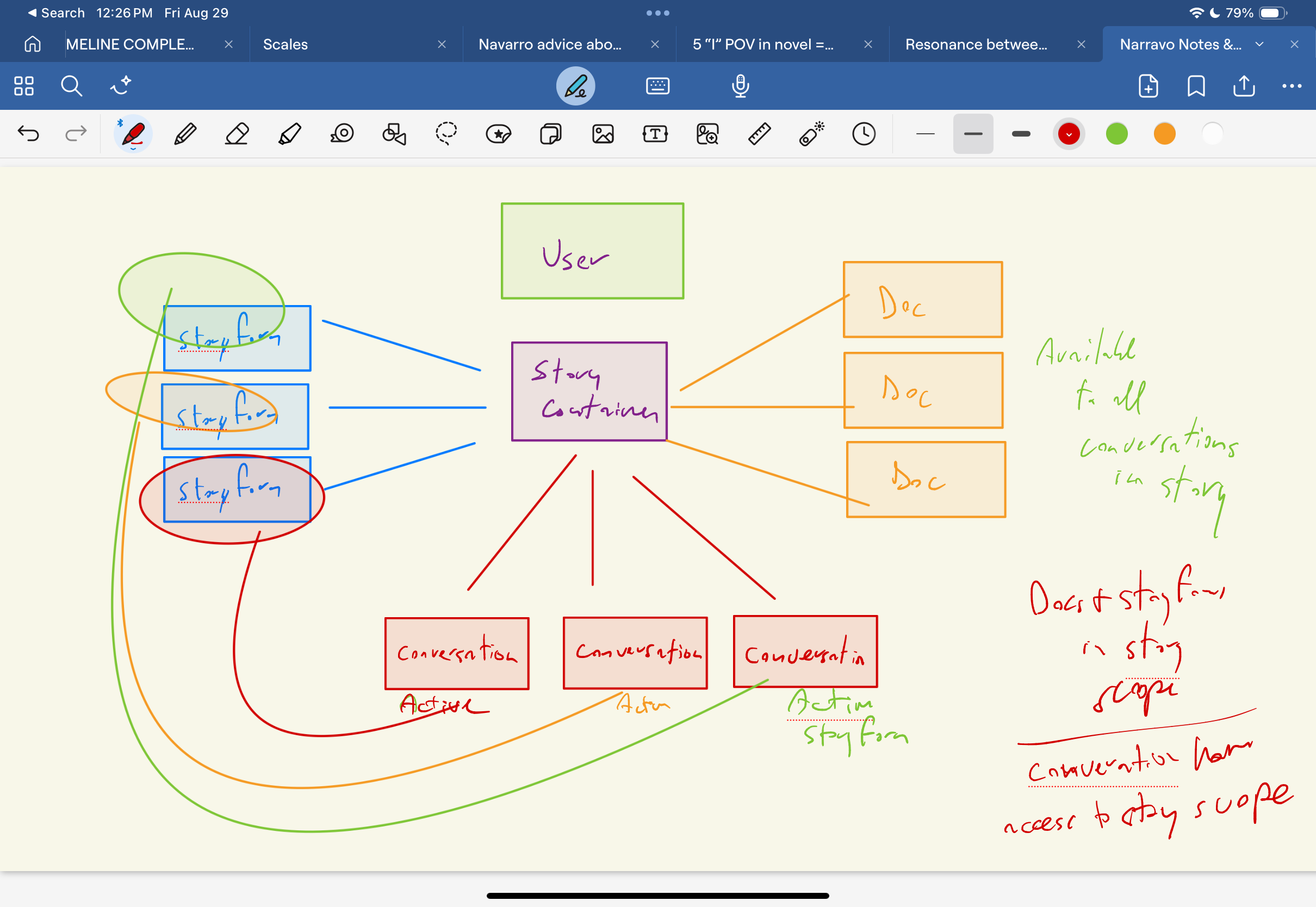
Have I got how this is organized and scoped right?
1 Like
Almost perfect.
In addition to having a Story “scope” (your image above), each individual Storyform has a “scope” as well. So you could have documents that exist solely in the Story, and documents that exist solely in the Storyform. And you can alternate between one or the other, both, or none.
Future roadmap has on/off visibility for individual documents within each scope. And automatic scoping of conversation responses while interacting with Narrova.
great. we should be able to ask Narrova for a hierarchical report on what documents have been uploaded, what storyforms exist, where everything is scoped It should be visual, especially since it’s as complex as you’ve indicated. Otherwise, people will be utterly confused. People like me 
It’s important because I need to know what I can ask Narrova to do in a conversation. If I’ve uploaded doc a to storyform a, then storyform b won’t have access to it, correct? If on the other hand I uploaded doc c to story c, which contains storyform d and e, and then both storyform d and e will have access to it. right?
I would think just going into the Story environments deterministically will grant you better results.
If you tap “Stories” in the upper right you get your list of Stories, their documents, associated Storyforms and their documents.
The answer to your questions:
If I’ve uploaded doc a to storyform a, then storyform b won’t have access to it, correct?
Correct. If your Context is set to Storyform B, but the doc is in Storyform A, Storyform B won’t know anything about it.
If on the other hand I uploaded doc c to story c, which contains storyform d and e, and then both storyform d and e will have access to it. right?
Correct. As long as you have the Story context set to the story, then you could have either the Storyform context set to Storyform D or Storyform E, or neither–and the conversation will be aware of the documents uploaded to the Story context.
Which leads to another question. The concept of Story Context* as being separate from Story is a little confusing. That I’m having to ask all these questions is indicative.
So:
Story A has Storyform A and Storyform B.
Storyform A has Doc A loaded, and Storyform B has Doc B loaded.
I’ve set my Context to Storyform B. So now I have access to Doc B in the conversation.
Then I set my Context to Story A. Do I now have access to the docs in both Storyform A and Storyform B (Doc A and Doc B)?
On the one hand, the story container and the storyform container each give you one kind of scope. But the conversation, while it belongs inside a story hierarchially, is also a ‘window’ onto both containerships, which makes different things available, unless I am misunderstanding.
Writers need to be able to see what uploads are available in their conversations quickly and easily so they’ll know what data they have access to on the fly. If I’m in storyform B and need Doc A, I’m going to s.o.o.l. if I don’t understand why Narrova is clueless when I ask it a question and it doesn’t know the answer because in that context it can’t see the data.
You really have to work on the principle of Least Surprise here, to get this right for the user. They should never be surprised when they’re working with your tool, but should feel in control of their information.
*Maybe don’t call it Story Context, just call it Context.
I really like the idea of being able to bring up what documents are avail in the current Context - and sure, I can add that! (i’ll get the robots to work on it, right away!)
to answer this:
Then I set my Context to Story A. Do I now have access to the docs in both Storyform A and Storyform B (Doc A and Doc B)?
No, because the Story Context is different from the Storyform Context. It helps to understand the difference between Storyform and Story (which I know you know, but for others…).
The Empire Strikes Back has two Storyforms in it – the one with Luke and Yoda, and the one with Han and Leia. The cast of Players exist in both, yet the Storyforms themselves are separate in and of themselves in terms of thematic conflict and narrative exploration:
- you would upload character sketches, backstory, dialogue, into the Story Context
- you would upload world-building, locations (Hoth, Dagobah, Cloud City) into the Story Context
- you would upload anything to do with the Force and all of its baggage into the Luke/Yoda Storyform
- you would upload anything to do with romance, asteroid belt, Lando/Han backstory into the Han/Leia Storyform
Then, when developing the whole training of Luke thing, you might select both the Story Context and the Luke/Yoda Storyform context. You don’t really need to know about Lando, or Boba Fett, or asteroids, but you might want to know about Luke and his friends as they exist as Players in context of the Story (not just a single Storyform).
Likewise, when you’re acting like a scoundrel on Bespin, you don’t really need access to documentation specific to the Force and guilt-trips  So you could just set it to the Han/Leia Storyform and work that out. When it comes to 3PO and Chewie, you could have documentation to them that is specific to that singular Storyform context, or just generally to the story as a whole.
For production companies, like Marvel or Star Wars, they would likely load their canon into an overall Story Context. They could then develop a hundred million storyforms that are in the context of that universe. And then, maybe if they were working in a singular franchise - like Guardians - they might have specific world-building for that series that would end up in individual Storyforms. If the series is meant to act as a single Storyform (Episodes 1,2, and 3) they might then have another Storyform that accounts for that and upload all the knowledge they have about those characters into that Storyform.
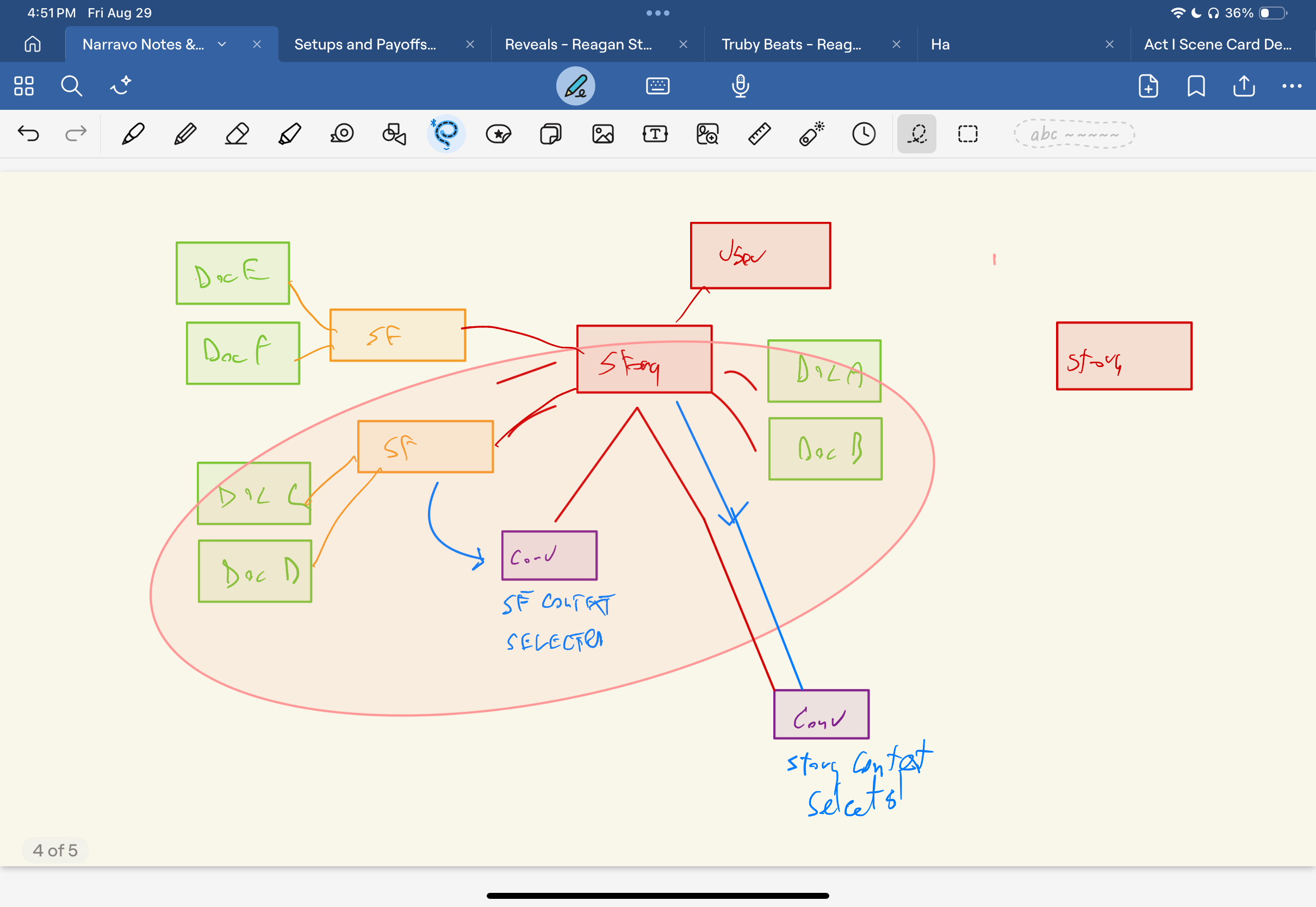
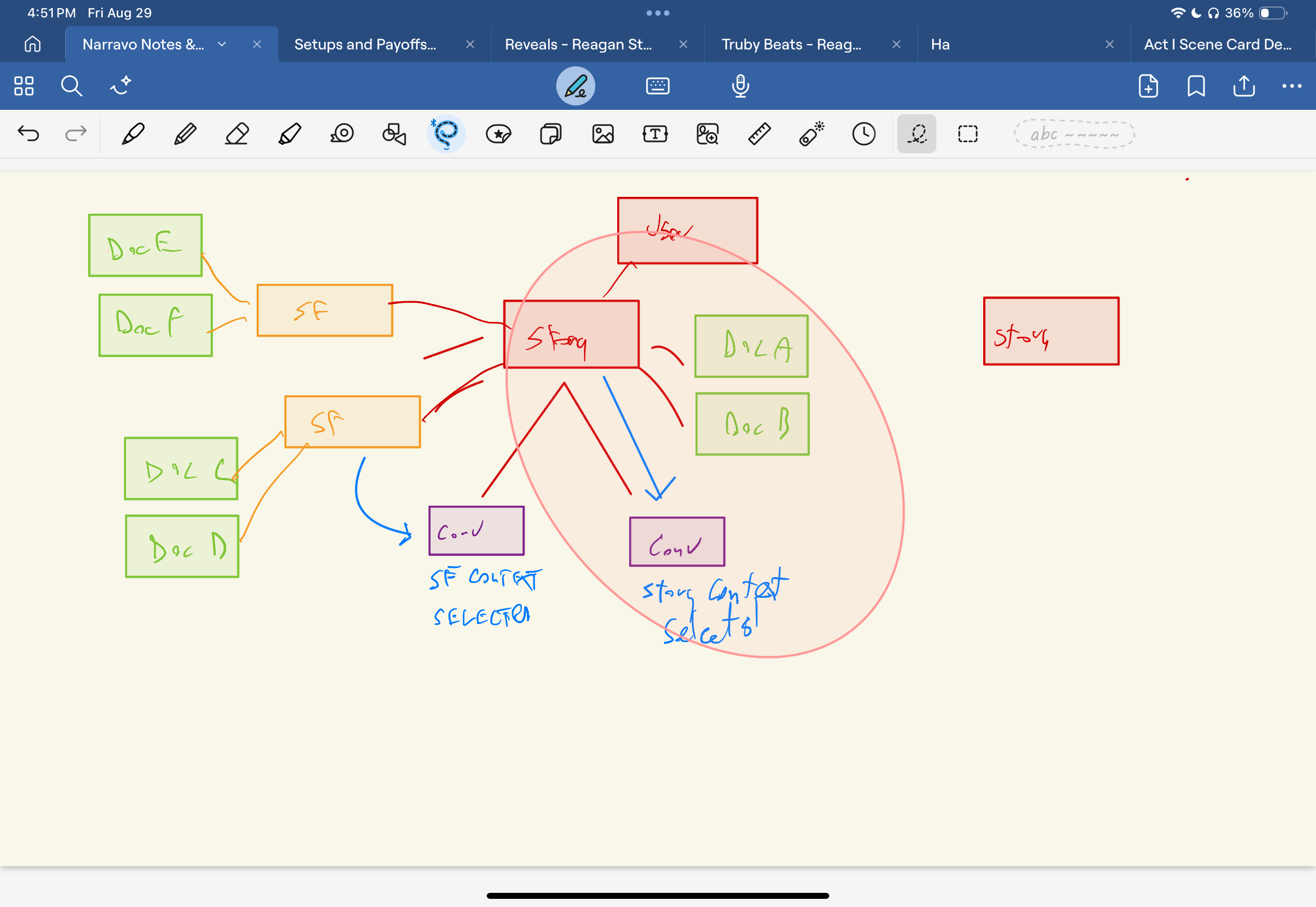
ok so there’s a ‘belongs-to’ relationship, an organizing thing, hierchal and 1-Many
stories belong to users
storyforms belong to stories
conversations belong to stories
============
then there’s an ‘owns-a’ relationship, it’s 1-1
story owns a context, uploaded docs live in that context
storyform owns a context, uploaded docs live that context.
=========
there there is a ‘uses-a’ relationship, 1-1
there are three use cases:
1 conversation uses a story context only.
2 conversation uses a single storyform context only*
3 conversation uses both a a story context and a single storyform context* (only the storyforms that belong to the same story the conversation belongs to) and can access documents uploaded to either the story context or the storyform context.
*Note, the story may contain multiple storyforms, each with their own context, but a conversation may only access a single storyform context at a time, either alone or paired with a story context.
(@jhull modified)
Perfect-o.
Everything is spot-on (even your belongsTo and hasOne refs!) except that a conversation can have both a Story context and a Storyform context (thank you OpenAI for finally making that possible…)
1 Like
See text modification. Will add new pictures soon.
When upload a document in a conversation that uses both a story context and a storyform context, to which context is that document uploaded?
The docs should explain it all: https://platform.dramatica.com/docs/narrova/context
Please let me know if its unclear in there.
There are three contexts: Story, Storyform and Conversation. You can currently only have two contexts set at once (technical limitation from OpenAI). If you try to upload a file when you have both Story and Storyform context, it should warn you that you would be better off directly loading it to those environments.
1 Like
bad link, says platform.dramatica.test, should be platform.dramatica.com
1 Like
it should warn you that you would be better off directly loading it to those environments.
as far as I can tell it doesn’t BUT since the context menu currently seems to report unreliably what the status is, I can’t tell.
This is what you will see if you try to upload when you already have both Story and Storyform Context set within your input:
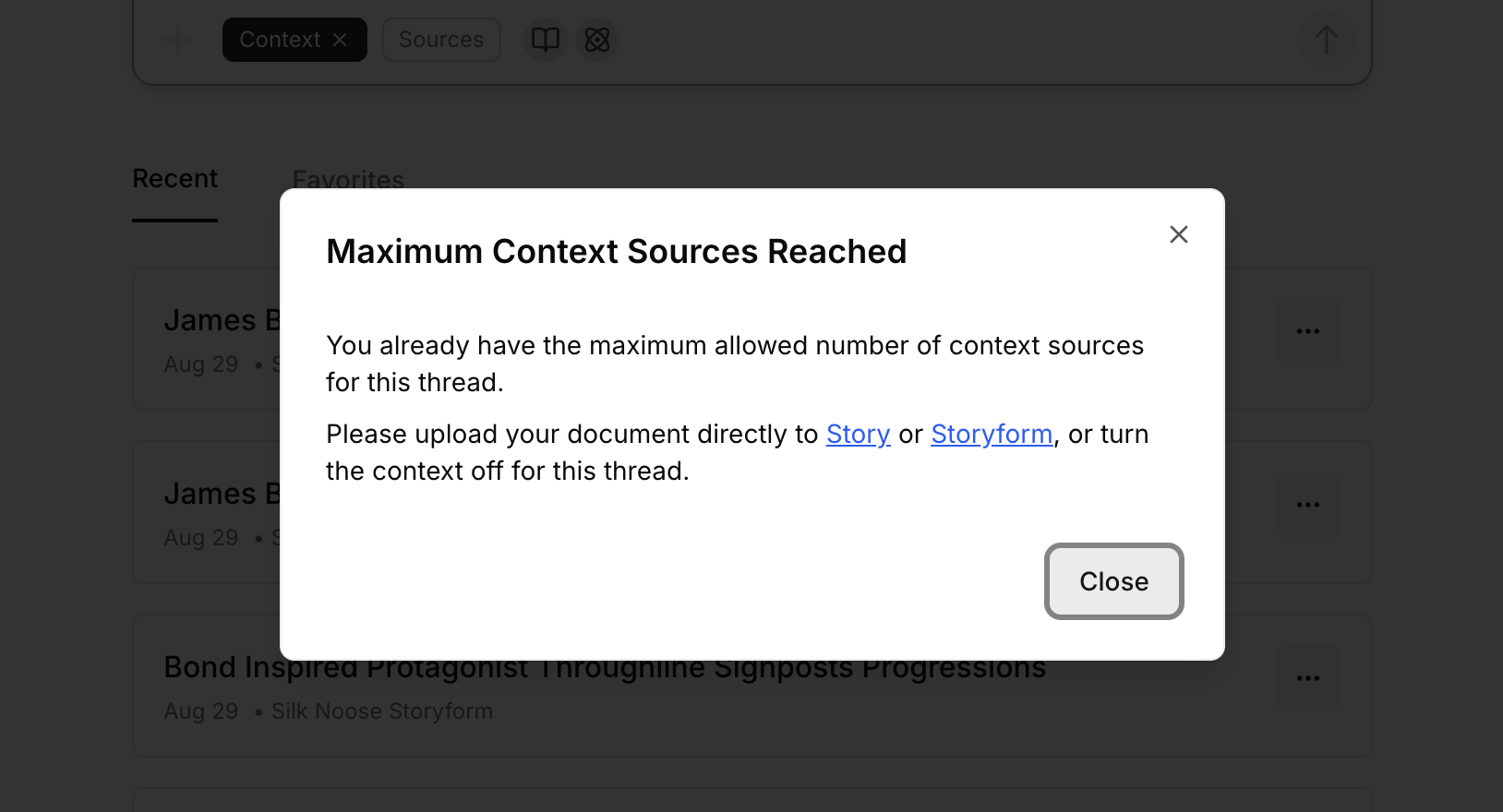
Got it. Haven’t seen that message yet. Doing some more tests now.
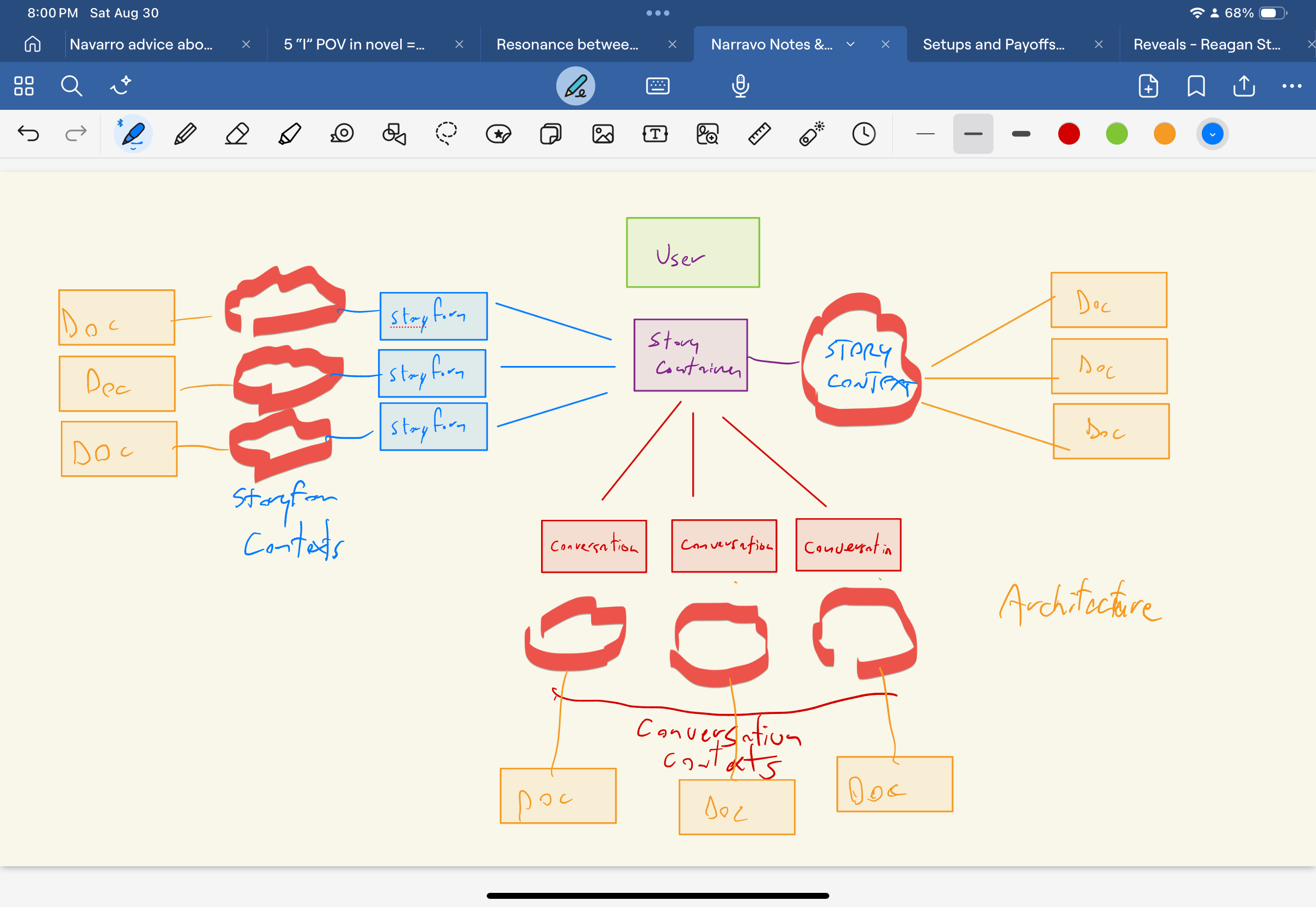

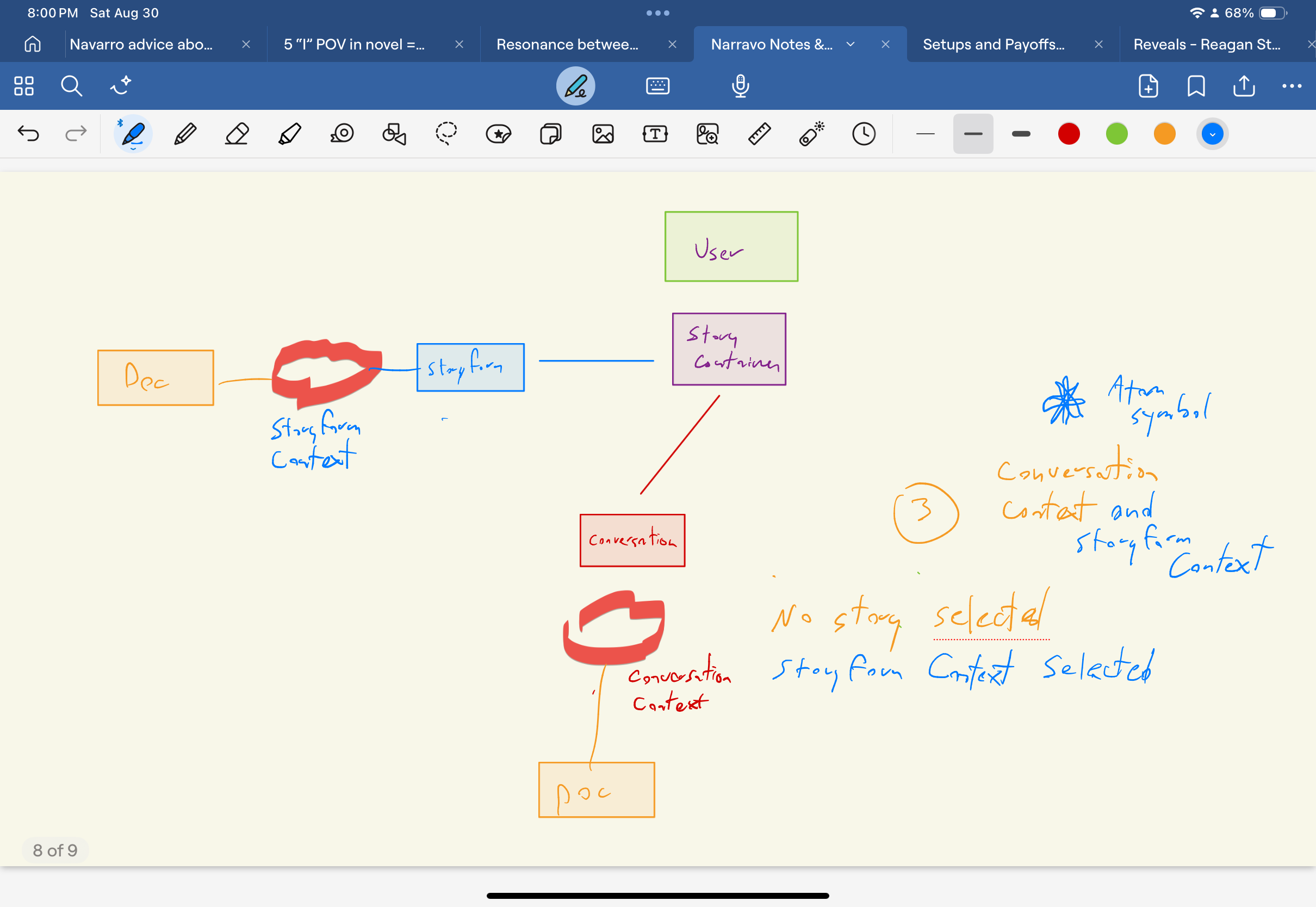
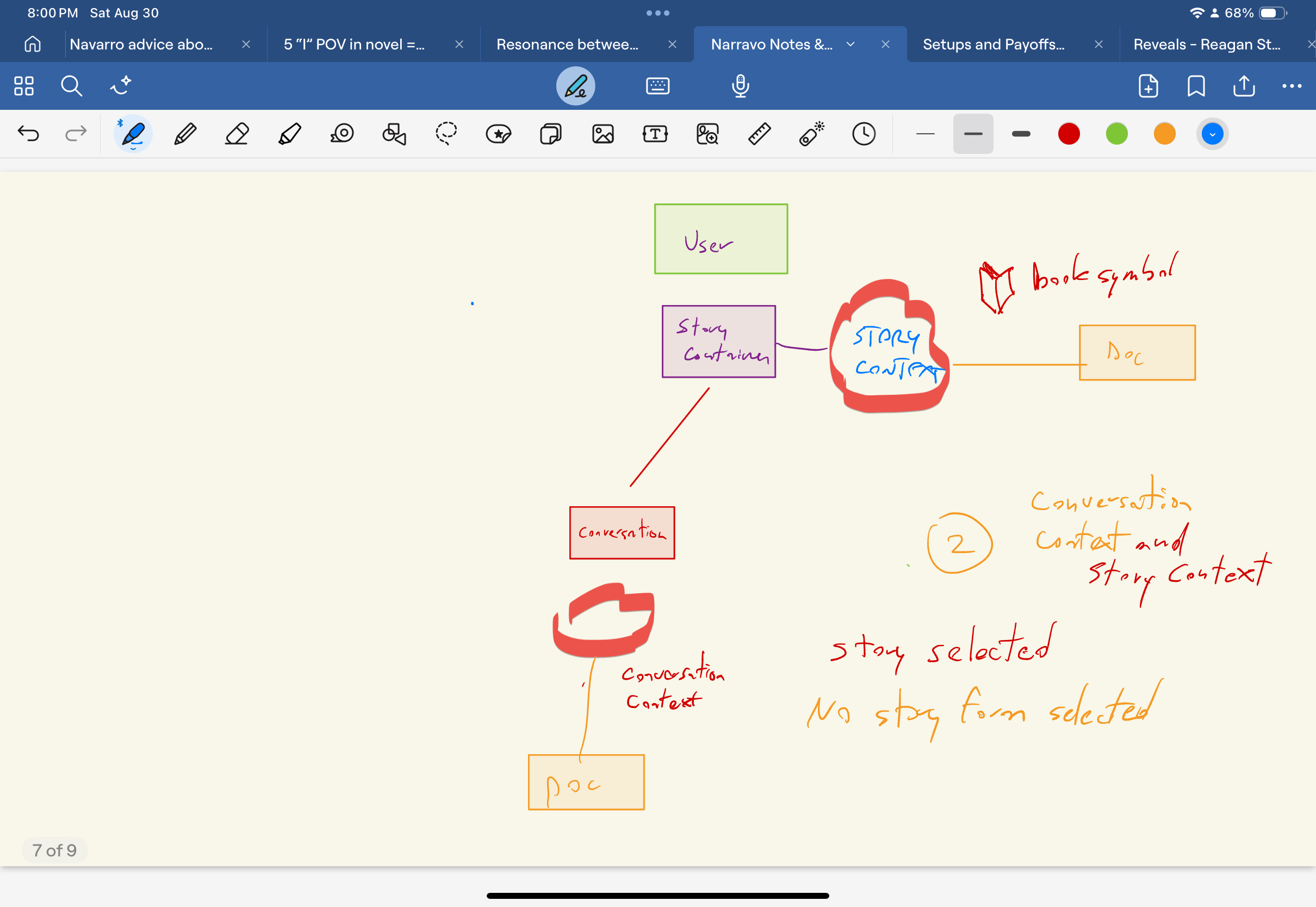
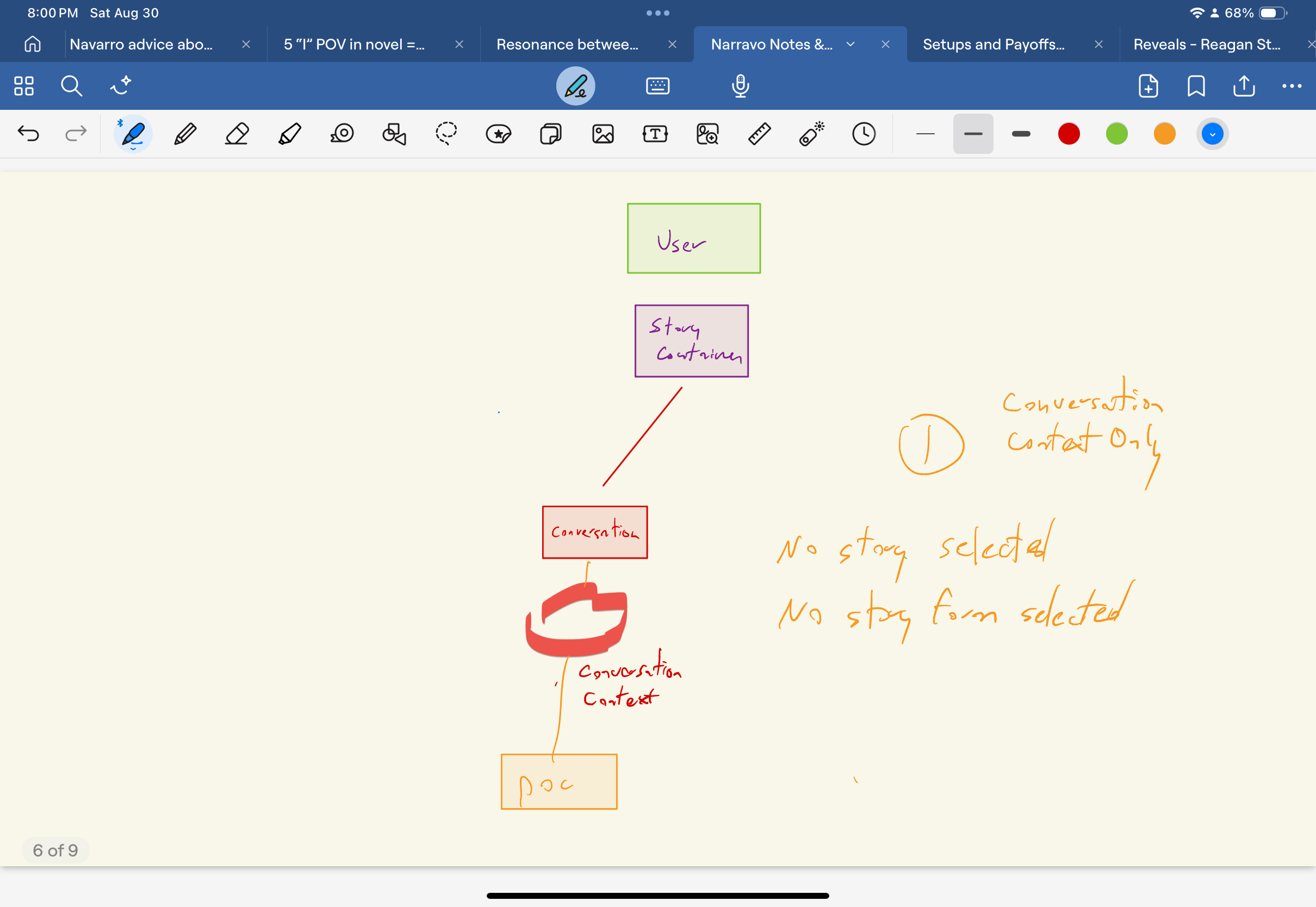
having read the documents carefully now, it also seems that the contexts are not identical, that they will behave differently. This could explain why, when I uploaded a timeline of diary entries to the Storyform context, it chose to focus only on the exciting stuff that started on the 24th of the month?
And when I uploaded the doc to conversation context or to story context, it behaved as expected?
Some more detail and focus on that fact in the documentation (if I am understanding things correctly) would seem to me to be appropriate. The experience, a walk through of a particular document, as it’s handled by each context, might be the right way to do that. Send the same document to each context, how’s it ‘treated’ differently.
sorry these pix are out of order.
I’m out of order! YOUR out of order! The whole damn SYSTEM is out of order!
I don’t even remember which movie that was.
The Storyform context includes the Storyform, so by definition it will not behave the same.